Supreme Deals® Latest Updated Version Mini DP 3 in1 Thunderbol | Shop The World
From India
NewSupreme Deals
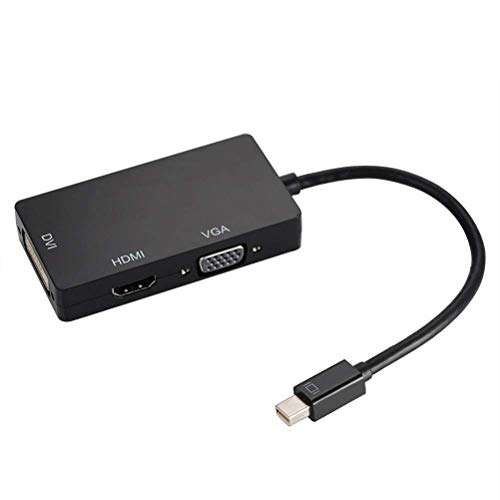
Supreme Deals® Latest Updated Version Mini DP 3 in1 Thunderbolt Port Compatible Mini DisplayPort to HDMI/VGA/DVI Adapter Converter for Apple Mac Book/Pro/Air (1 Year Warranty)
•?WIDE RANGE OF COMPATIBILITY :- Compatible with Apple MacBook, MacBook Pro, MacBook Air, iMac, Mac mini, Mac Pro; Microsoft Surface Pro/Pro 2/Pro 3 (NOT Surface for Windows RT); Lenovo ThinkPad X1 Carbon, X230/X240s, L430/L440/L530/L540, T430/T440/T440s/T440p/T530/540p, W530/W540, Helix; Latitude E7240/E7440, Precision M3800; Alienware 14/17/18; Acer Aspire R7/S7/V5/V7; Intel NUC; Asus Zenbook; HP Envy 14/17; Google Chromebook Pixel; Cyberpower Zeusbook Edge X6; Toshiba Satellite Pro S500, Tec
•?3-IN-1 :- it contains three different type of ports (HDMI/DVI/VGA ). Connecting a mini displayport compatible computer to an HDTV or Projector with HDMI/VGA/DVI port in few minutes. Automatically detects the mini-display port connection by input and output portable adapter for connecting a Mini DisplayPort (Thunderbolt port) to HDMI, monitor or projector with HDMI/DVI/VGA cable.
•?HIGH RESOLUTION AUDIO & VIDEO: - HDMI/ DVI/ VGAwith a maximum resolution of 1920x1080p in 60hz, 225mhz / 2.25Gbps per channel (full channel 6.75Gbps), 12 bits per channel (36 full channels). Mini displayport plug and HDMI can support imac (end of 2009) and Macbook Pro (mid-2010) audio output. Support audio output. When connecting the iMac (Late 2009) and Mac Book Pro (Mid 2010) to HDMI display, please set Sound on the dialog box of System Preferences to get audio output DP V1.2 enables hi
•?GREAT SPEED FOR MIRROR OR EXTEND DISPLAY :-You can connect the display to one of HDMI/DVI/VGA output ports. Mini DP V1.2 Version, backward compatible with DP V1.1, given much faster transfer rate up to 5.4Gbps per lane to enable emerging display applications. Enables full 4K x 2K resolution(Only HDMI Port), 3D stereo beyond full HD, Supports video resolutions up to 3840*2160 and support stereoscopic images beyond full HD. connectors resist corrosion, provide rigidity, and improve the signal p
•?INSTALLATION :- Connect the Mini DisplayPort connector on the video adapter to the Mini DisplayPort port on the host computer system. The computer system can be turned on or off (check documentation for the computer system for details). Power on the display device. Connect the display device (i.e. monitor) to the video adapter using the appropriate type of video cable (sold separately). NOTE :- Only one of the 3 outputs(VGA/HDMI/DVI) could be used at a time, you cannot use all of them simulta