Razer DeathAdder V3 Pro Wireless Gaming Mouse + Hyperpolling W | Shop The World
From USA
NewRazer
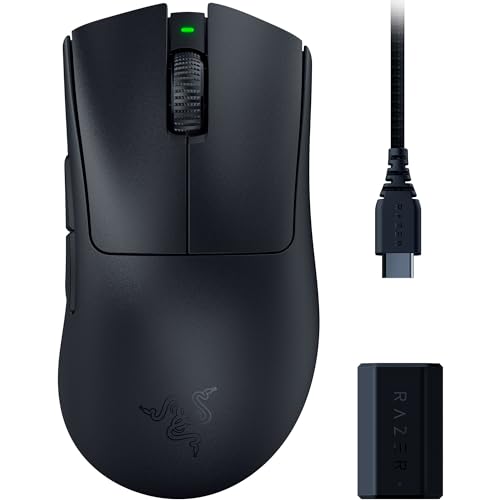
Razer DeathAdder V3 Pro Wireless Gaming Mouse + Hyperpolling Wireless Dongle: 63g Ultra Lightweight - Focus Pro 30K Optical Sensor - Optical Switches Gen-3-5 Programmable Buttons - Black
ℹ
Products from the USA may come with an input voltage of 110V–120V, requiring a step-down transformer. Check the device wattage to select the correct power converter.
•63G ULTRA-LIGHTWEIGHT DESIGN — Enjoy a level of speed and control favored by the world’s top players with one of the lightest ergonomic esports mice ever created
•ERGONOMIC FORM — Developed in partnership with top esports pros, the iconic shape of the Razer DeathAdder has been further improved to continue its legacy of award-winning handling and comfort
•HYPERPOLLING WIRELESS TECHNOLOGY — By combining Razer HyperPolling with the ultra-low-latency connection of Razer HyperSpeed, we’ve created the world’s fastest wireless technology that’s 8x faster than standard 1000 Hz wireless mice
•FOCUS PRO 30K OPTICAL SENSOR — Flawless tracking performance on a wider variety of surfaces including glass—supported by intelligent functions for enhanced aim and control
•OPTICAL MOUSE SWITCHES GEN-3 — From an improved 90-million click lifecycle with zero double-clicking issues, to a blistering 0.2ms actuation with no debounce delay, the mouse has the reliability and speed built for esports
•UP TO 90 HOURS OF BATTERY LIFE — Smaller, lighter battery that boasts greater power efficiency and can run for up to 90 hours of continuous play — rechargeable via USB Type C
•#1 SELLING PC GAMING PERIPHERALS BRAND IN THE U.S. — Source: Circana, Retail Tracking Service, U.S., Dollar Sales, Gaming Designed Mice, Keyboards, and PC Headsets, Jan. 2019- Dec. 2023 combined
•FIRMWARE UPDATE — For HyperPolling Wireless Dongle users, please ensure you are on Synapse 3 version 3.8 or later before attempting this update, and update the firmware of your HyperPolling Wireless Dongle before updating your mouse
•OPTIMIZE MOUSE ACCURACY — Improve accuracy by disabling the "Enhance pointer precision" option in the Windows mouse settings, and further optimize performance using the Razer Synapse App
 From USA