product-image
product-image
product-image
product-image
product-image
Product Image
    1
    2
    3
    4
    5
    6
new | WWZMDiB USB to RS485/RS232 Converter - Supports USB to RS232 and RS485, Single Function Use
Brand : WWZMDiB
new | WWZMDiB USB to RS485/RS232 Converter - Supports USB to RS232 and RS485, Single Function Use
Brand : WWZMDiB

 3,069.00
M.R.P : 5,115.00

40% OFF

Availability : 
In Stock

*Prices subject to change due to market. The price shown in the checkout is the guaranteed price.
3,069.00
M.R.P : 5,115.00

40% OFF

Availability : 
In Stock
Delivery :
Available This pincode is not serviceable! Please try with a different pincode Checking...
Quantity
7 days   Replacement
7 days Replacement
Manufacturers Warranty
Top Brand
Top Brand
Free delivery
Free delivery
Secure Transaction
Secure Transaction
Blue Dart Delivered
Blue Dart Delivered
100% Guarantee Safe Checkout
  • visa
  • mastercard
  • discover
  • Maestrocard
  • paypal
  • americanexpress
  • paytm
  • upi
Note: Please be aware that products from the USA may come with an input voltage of 110V - 120V, requiring the use of an appropriate step-down transformer for compatibility. Understanding the device's wattage is essential for selecting the correct power converter.
Product Specifications
Conditionnew
AsinB0BL3NJTBJ
CategoryElectronics
SubcategorySerial Adapters
LeafcategoryELECTRONIC_ADAPTER
MPNUSB to RS485 RS232
ColorBlue
Connector TypeSerial Adapter
OriginUSA
BrandnameWWZMDiB
Weight1
Warranty Description1
Product Details
USB to RS485 RS232 Converter: The product can support USB to RS232 and USB to RS485, but the two functions cannot be used at the same time.RS-485 flow control mode automatic flow control
Voltage:UBS 5 V
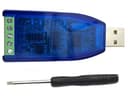
New Original Chip CH340,Transmission distance up to 1200 meters (tested at 9600bps)
Support baud rate RS232: 300bps-120kbps. RS485 :300bps-1Mbps
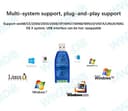
Support win98/CE/2000/2003/2008/XP/WIN7/WIN8/WIN10/VISTA/LINUX/MAC OS X system, USB interface can be hot-swappable
Industrial grade protection: TVS transient suppression protection, ESD protection, surge protection, AB signal line shorting and shorting protection with power supply (shorting does not burn)
Product Ranking
#152 in Serial Adapters
Product Description
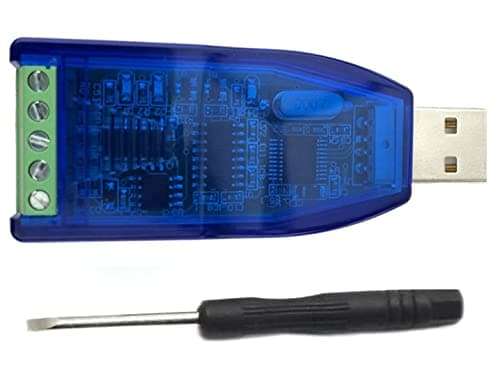
WWZMDiB USB to RS485 RS232 Converter The product can support USB to RS232 and USB to RS485, but the two functions cannot be used at the same time

USB to RS485 RS232 Converter: The product can support USB to RS232 and USB to RS485, but the two functions cannot be used at the same time.RS-485 flow control mode automatic flow control.
Voltage:UBS 5V
New Original Chip CH340,Transmission distance up to 1200 meters (tested at 9600bps)
Support baud rate RS232: 300bps-120kbps. RS485:300bps-1Mbps.
Support win98/CE/2000/2003/2008/XP/WIN7/WIN8/WIN10/VISTA/LINUX/MAC OS X system, USB interface can be hot-swappable
Industrial grade protection: TVS transient suppression protection, ESD protection, surge protection, AB signal line shorting and shorting protection with power supply (shorting does not burn)

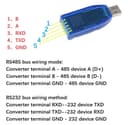
RS485 bus wiring mode:
Converter terminal A - 485 device A (D+)
Converter terminal B - 485 device B (D-)
Converter terminal GND - 485 device GND

RS232 bus wiring method:
Converter terminal RXD--232 device TXD
Converter terminal TXD--232 device RXD
Converter terminal GND - 232 device GND

USB to 232 self-closing loop:
Connect the TXD and RXD of the module with Dupont wire, then plug the module into the computer and use the serial debugging assistant to send data to see if the corresponding data is returned. If you can receive the sent data, it proves that the module functions normally.

Usb to 485 self-closing loop test (this mode test needs to work with other 485 devices, such as using two 2-in-1 modules) download debugging software and open the interface of the two debugging software, plug the two converters into the computer, open the device manager to see the virtual com port number, and set the com port number to the corresponding position in the debugging software, connect the two converters A to A, B to B, and give them to each other send data to each other.

Driver installation instructions
1, install the driver: download the driver, double-click the icon CH340, click "Next" to install until prompted to click the "Finish" button, the driver installation is complete. When the driver is successfully installed, insert the converter, the system will virtualize a serial port (such as: COM5 can be viewed in the device manager).

Note: If the virtual serial port port number is greater than 7, please change it to 1-7 to use, the port will affect the stability.

2, set the com port: set the virtual serial port number to the corresponding location of the software. Such as set to the serial debugging software com port; can be used. No matter what the driver installation;'
Product Description
WWZMDiB USB to RS485 RS232 Converter The product can support USB to RS232 and USB to RS485, but the two functions cannot be used at the same time

USB to RS485 RS232 Converter: The product can support USB to RS232 and USB to RS485, but the two functions cannot be used at the same time.RS-485 flow control mode automatic flow control.
Voltage:UBS 5V
New Original Chip CH340,Transmission distance up to 1200 meters (tested at 9600bps)
Support baud rate RS232: 300bps-120kbps. RS485:300bps-1Mbps.
Support win98/CE/2000/2003/2008/XP/WIN7/WIN8/WIN10/VISTA/LINUX/MAC OS X system, USB interface can be hot-swappable
Industrial grade protection: TVS transient suppression protection, ESD protection, surge protection, AB signal line shorting and shorting protection with power supply (shorting does not burn)

RS485 bus wiring mode:
Converter terminal A - 485 device A (D+)
Converter terminal B - 485 device B (D-)
Converter terminal GND - 485 device GND

RS232 bus wiring method:
Converter terminal RXD--232 device TXD
Converter terminal TXD--232 device RXD
Converter terminal GND - 232 device GND

USB to 232 self-closing loop:
Connect the TXD and RXD of the module with Dupont wire, then plug the module into the computer and use the serial debugging assistant to send data to see if the corresponding data is returned. If you can receive the sent data, it proves that the module functions normally.

Usb to 485 self-closing loop test (this mode test needs to work with other 485 devices, such as using two 2-in-1 modules) download debugging software and open the interface of the two debugging software, plug the two converters into the computer, open the device manager to see the virtual com port number, and set the com port number to the corresponding position in the debugging software, connect the two converters A to A, B to B, and give them to each other send data to each other.

Driver installation instructions
1, install the driver: download the driver, double-click the icon CH340, click "Next" to install until prompted to click the "Finish" button, the driver installation is complete. When the driver is successfully installed, insert the converter, the system will virtualize a serial port (such as: COM5 can be viewed in the device manager).

Note: If the virtual serial port port number is greater than 7, please change it to 1-7 to use, the port will affect the stability.

2, set the com port: set the virtual serial port number to the corresponding location of the software. Such as set to the serial debugging software com port; can be used. No matter what the driver installation;'