product-image
product-image
product-image
product-image
    1
    2
    3
    4
    5
    6
flagProduct From USA  
new | KONYEAD pcie4.0 x16 to m.2 m-Key nvme x 4 ssd Expansion Card,Supports 4 NVMe M.2 2280 up to 256Gbps,M2 Adapter Card 2280 Driver Free. Bifurcation Required(3001K)…
Brand : KONYEAD
new | KONYEAD pcie4.0 x16 to m.2 m-Key nvme x 4 ssd Expansion Card,Supports 4 NVMe M.2 2280 up to 256Gbps,M2 Adapter Card 2280 Driver Free. Bifurcation Required(3001K)…
Brand : KONYEAD
Availability : 
Out Of Stock
Click to connect with our customer support
Product Specifications
Conditionnew
AsinB09XSY3JVS
CategoryElectronics
SubcategoryRAID Controllers
LeafcategoryINPUT_OUTPUT_CARD
MPNKONYEAD pcie4 0
Color3001K
OriginUSA
BrandnameKONYEAD
Weight1
Warranty Description180 DAYS
Product Details
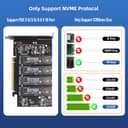
[Important before purchase] The motherboard must support PCIe split(Bifurcation) function and be able to set PCIe X4X4X4X4 or 4X4 mode; the motherboard supports PCIe RAID function (the number of PCIe split channels varies from motherboard, some motherboards PCIe RAID is X8+X4+X4).
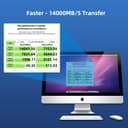
[Lossless Transfer] RAID0 can consolidate the speed of all nvme drives to increase the read speed up to 14000MB/S.
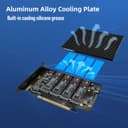
[High Quality] Using four power supply DC module can effectively protect the hard disk and data security.
[Safe Power Supply] The adapter is 12V to 3.3V with a 4-way 6A independent power module to meet the power supply requirements of high power SSDs.
[Note]: The motherboard must support PCI-E split function and be able to set PCI-E X4X4X4 or 4X4 mode; the motherboard supports PCI-E RAID function (the number of PCI-E split channels varies from motherboard to motherboard, some motherboards PCI-E RAID is X8+X4+4X).This product does not include NVMe SSD Solid State Drive
[Quality Service]If you have any questions about 3001k, please contact us by email, we are very happy to help you solve the problem.
Product Ranking
#240 in Internal Solid State Drives
Product Description
Points to note before purchasing. [Note]: Please be sure to confirm whether your motherboard supports the PCIe split function(Bifurcation Motherboard) before buying this adapter card from us! If you do not support the PCIE split function will not be able to use this product properly. [Note before purchase]: 1.The motherboard must support PCIe split function(Bifurcation Motherboard) , able to set PCIe X4X4X4x4 or 4X4 mode; different motherboards PCIe split channel number is different, some motherboards PCIe RAID is X8 + X4 + X4, this motherboard 4-bit M.2 card can only support 3 M.2 SSD or device, 2-bit M.2 card can only support 1 M.2 SSD or device, if you need to use this product properly, please select the correct motherboard. 2.To create a RAID array, please use M.2 hard disks of the same model and capacity. 3.Many motherboards are sharing PCIe lanes, make sure the motherboard can support the function of PCIe split(Bifurcation Motherboard), but can not identify so many M.2 SSDs or devices, please remove other PCIe devices or replace the slot, such as graphics cards, expansion cards, onboard NVME SSDs, etc. . 4.Some motherboard only the first PCIe x16 slot support the PCIe split(Bifurcation), if occupied then there is no place to insert the graphics card, please be sure to consider clearly before purchase it. 5.Some motherboards PCIe slot is bandwidth sharing, such as the first PCIe slot is PCIe x16, the second PCIe slot is PCIe x8, if the two PCIe slots are inserted device at the same time, all the two PCIe slot is running at PCIe x8 bandwidth, then not all M.2 hard drives can be identified. Also some motherboard PCIe slot and U.2 is only one of two choices, please pay attention to read the motherboard manual. 5. CPU support is required, the CPU should have enough PCIe channels, generally low-end CPUs do not have enough PCIe channels so they may not be able to support, when shopping for a CPU you can refer to the motherboard introduction to make the right c
Product Description
Points to note before purchasing. [Note]: Please be sure to confirm whether your motherboard supports the PCIe split function(Bifurcation Motherboard) before buying this adapter card from us! If you do not support the PCIE split function will not be able to use this product properly. [Note before purchase]: 1.The motherboard must support PCIe split function(Bifurcation Motherboard) , able to set PCIe X4X4X4x4 or 4X4 mode; different motherboards PCIe split channel number is different, some motherboards PCIe RAID is X8 + X4 + X4, this motherboard 4-bit M.2 card can only support 3 M.2 SSD or device, 2-bit M.2 card can only support 1 M.2 SSD or device, if you need to use this product properly, please select the correct motherboard. 2.To create a RAID array, please use M.2 hard disks of the same model and capacity. 3.Many motherboards are sharing PCIe lanes, make sure the motherboard can support the function of PCIe split(Bifurcation Motherboard), but can not identify so many M.2 SSDs or devices, please remove other PCIe devices or replace the slot, such as graphics cards, expansion cards, onboard NVME SSDs, etc. . 4.Some motherboard only the first PCIe x16 slot support the PCIe split(Bifurcation), if occupied then there is no place to insert the graphics card, please be sure to consider clearly before purchase it. 5.Some motherboards PCIe slot is bandwidth sharing, such as the first PCIe slot is PCIe x16, the second PCIe slot is PCIe x8, if the two PCIe slots are inserted device at the same time, all the two PCIe slot is running at PCIe x8 bandwidth, then not all M.2 hard drives can be identified. Also some motherboard PCIe slot and U.2 is only one of two choices, please pay attention to read the motherboard manual. 5. CPU support is required, the CPU should have enough PCIe channels, generally low-end CPUs do not have enough PCIe channels so they may not be able to support, when shopping for a CPU you can refer to the motherboard introduction to make the right c