product-image
Product Image
    1
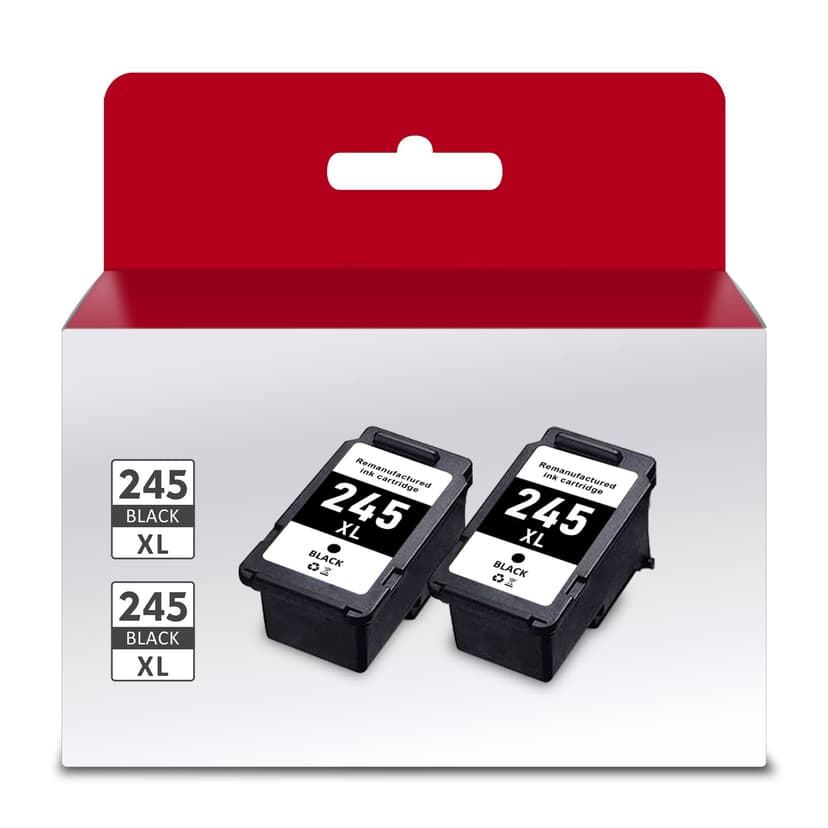
new | PG-245XL Black Ink Cartridge Replacement for Canon 245 XL 243 Black Ink cartridges for Canon MX490 MX492 TR4520 TR4522 TS3322 TS3122 TS202 MG2522 MG3022 (2 Black)
Brand : INKMATE
new | PG-245XL Black Ink Cartridge Replacement for Canon 245 XL 243 Black Ink cartridges for Canon MX490 MX492 TR4520 TR4522 TS3322 TS3122 TS202 MG2522 MG3022 (2 Black)
Brand : INKMATE
Availability : 
Out Of Stock
Click to connect with our customer support
Product Specifications
Conditionnew
AsinB08PKGM3D9
CategoryOffice Products
SubcategoryInkjet Printer Ink
LeafcategoryCE
MPNCanon Pg-245Xl PG-243XL
ColorBlack
OriginUSA
BrandnameINKMATE
Height1
Length1
Width1
Weight1
Product Details
➤Printer Compatibility: Canon Pixma MX490 MX492 MX498 MG2420 MG2450 MG2520 MG2522 MG2525 MG2555 MG2550 MG2920 MG2922 MG2924 MG2950 MG3020 MG3022 MG3029 Canon Pixma TS202 TS302 TS3120 TS3122 TR4520 TR4522 IP2820 IP2850 Printer.
➤Package Included:245XL black ink cartridge 2 Pack Double Remanufactured Replacement for Canon 245 XL ink cartridges.
INKMATE Remanufactured canon 245XL high yield ink cartridges are recycled from the original PG245XL ink cartridge.
➤Page yield: canon ink 245XL 245 double black up to 450 pages per black ink cartridge(5% coverage).
➤INKMATE continues to provide you vivid graphics & crisp text, make your printing life easy.
Product Description

INKMATE make your life colorful !

Package contents:
➤ canon ink cartridge 245 xl black 2PK
➤ In addition, our PG 245 XL is an incremental version of PG 245. They are compatible.
➤ The high-quality chips we use make them compatible with canon PG 245XL black ink cartridges. Please rest assured to use .

Compatible Printer Models:
➤canon MX490 ink cartridges
➤canon MX492 ink cartridges
➤canon MG2520 ink cartridges
➤canon MG2920 ink cartridges
➤canon MG2922 ink cartridges
➤canon MG2924 ink cartridges
➤canon MG2420 ink cartridges
➤canon MG2522ink cartridges
➤canon MG2525 ink cartridges
➤canon MG2555 ink cartridges
➤canon MG3020 ink cartridges
➤canon IP2820 ink cartridges

Tips:
➤Remove the black cover outside.
➤Remove scotch tape. (Do not touch copper contacts and nozzles.)

What if the doesn't print as well?
➤ Realign the printheads and activate the printhead cleaning function.

What should I do if the printer receives "out of ink / almost out of ink / ink cartridges are not recognized"?
➤ Remove the affected PG 245 XL/PG 245XL black cartridge, carefully wipe the chip with an eraser / alcohol swab and reinsert it.

How to contact us:
➤ PC: Go directly to the "INKMATE" store.> Click on "Question".> Log into your Amazon account
➤Mobile: Log in to your Amazon account.> Find "INKMATE Orders" and click "Contact Seller". Or go straight to the INKMATE shop> Search and click About Seller> Contact Seller

Product Description

INKMATE make your life colorful !

Package contents:
➤ canon ink cartridge 245 xl black 2PK
➤ In addition, our PG 245 XL is an incremental version of PG 245. They are compatible.
➤ The high-quality chips we use make them compatible with canon PG 245XL black ink cartridges. Please rest assured to use .

Compatible Printer Models:
➤canon MX490 ink cartridges
➤canon MX492 ink cartridges
➤canon MG2520 ink cartridges
➤canon MG2920 ink cartridges
➤canon MG2922 ink cartridges
➤canon MG2924 ink cartridges
➤canon MG2420 ink cartridges
➤canon MG2522ink cartridges
➤canon MG2525 ink cartridges
➤canon MG2555 ink cartridges
➤canon MG3020 ink cartridges
➤canon IP2820 ink cartridges

Tips:
➤Remove the black cover outside.
➤Remove scotch tape. (Do not touch copper contacts and nozzles.)

What if the doesn't print as well?
➤ Realign the printheads and activate the printhead cleaning function.

What should I do if the printer receives "out of ink / almost out of ink / ink cartridges are not recognized"?
➤ Remove the affected PG 245 XL/PG 245XL black cartridge, carefully wipe the chip with an eraser / alcohol swab and reinsert it.

How to contact us:
➤ PC: Go directly to the "INKMATE" store.> Click on "Question".> Log into your Amazon account
➤Mobile: Log in to your Amazon account.> Find "INKMATE Orders" and click "Contact Seller". Or go straight to the INKMATE shop> Search and click About Seller> Contact Seller