product-image
product-image
product-image
product-image
product-image
Product Image
    1
    2
    3
    4
    5
    6
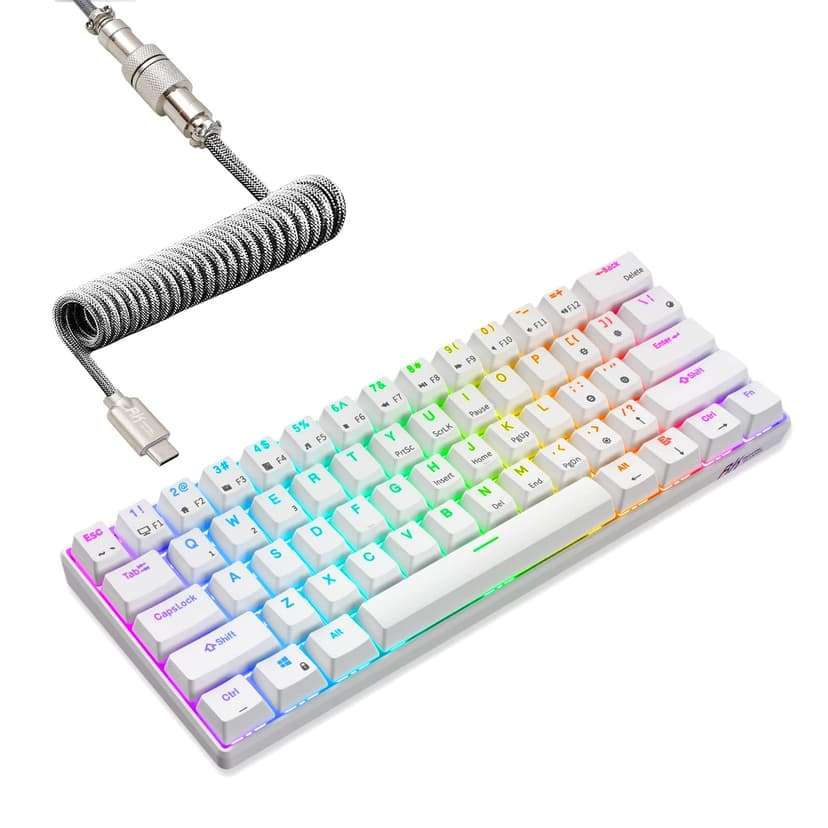
new | RK ROYAL KLUDGE RK61 60% Mechanical Keyboard with Coiled Cable, 2.4Ghz/Bluetooth/Wired, Bluetooth 61 Keys, Wireless RGB Hot Swappable Brown Switch Gaming Mini Keyboard with Software - White
Brand : RK ROYAL KLUDGE
new | RK ROYAL KLUDGE RK61 60% Mechanical Keyboard with Coiled Cable, 2.4Ghz/Bluetooth/Wired, Bluetooth 61 Keys, Wireless RGB Hot Swappable Brown Switch Gaming Mini Keyboard with Software - White
Brand : RK ROYAL KLUDGE

 12,401.00
M.R.P : 20,668.00

40% OFF

In Stock

*Prices subject to change due to market. The price shown in the checkout is the guaranteed price.
12,401.00
M.R.P : 20,668.00

40% OFF

In Stock
Check Delivery Availability
Available This pincode is not serviceable! Please try with a different pincode Checking...
Quantity:
1
7 days   Replacement
7 days Replacement
Secure Transaction

Secure Transaction
Free delivery
Free delivery
Manufacturers Warranty

Top Brand
Top Brand
Blue Dart Delivered
Blue Dart Delivered
safe and secure pay
100% Secure Payments
Safe and Trusted Checkout
  • Visa
  • MasterCard
  • Discover
  • PayPal
  • Amex
  • Paytm
  • UPI
Note: Please be aware that products from the USA may come with an input voltage of 110V - 120V, requiring the use of an appropriate step-down transformer for compatibility. Understanding the device's wattage is essential for selecting the correct power converter.
Product Specifications
Condition
New
Asin
B07P832XSX
Category
Video Games
Subcategory
Gaming Keyboards
Leafcategory
CE
MPN
01-001-061-00-05
Color
White
Keyboard Description
Mechanical, Gaming
Origin
USA
Brandname
RK ROYAL KLUDGE
Height
1
Length
1
Width
1
Weight
2
Display Size
7 inches
Product Details
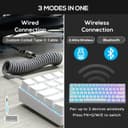
【3 Modes Connectivity】 With 2.4Ghz wireless, Bluetooth, and USB wired 3 modes connection, this is a wireless gaming keyboard that no longer limits how you can connect. What’s more, in Bluetooth mode, you can connect up to 3 devices. Compatible with Windows/ MacOS/ Android.
【61 Keys Compact Design】No additional number keys, can meet you demands in Office or Home. The Mini 60% Mechanical Keyboard is Space-saving and Portable, you will be satisfied at how much space you save.
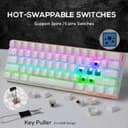
【Hot-Swappable Brown Switch】Slightly quieter and easier to trigger than the Blue Switch. Halfway between a Typing and a Gaming switch.Some people prefer Brown Switch since it enables you to Double Tap faster and Typists like them because they still have a good Tactile feedback, but the audio feedback isn't quite as noticeable as Blue Switch.
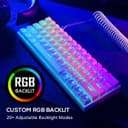
【RGB Backlit】This 60% Custom Mechanical Keyboard has 18 RGB Backlight Modes, 8 monochrome Backlight Modes and 1 full Color Backlight. These light modes can provide you a charming gaming environment at night.
【Ergonomic Designed】The RK61 is designed with 8°Ergonomic angle which can help you relieve straining effectively.The integrated wrist rest gives you the comfort you need for marathon gaming sessions.
What's Inside The Box ?
USB Cable
Product Ranking
#706 in PC Gaming Keyboards
#7928 in Video Games
Product Description

Introduction:

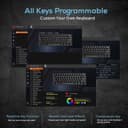
This is a RGB backlight mechanical keyboard with 61 keys.It supports Wireless/Wired Dual Mode Connections to the device and Compatible with Windows/MacOS/Android.It has various application designs,such as All Keys Without Conflict,brilliant color Backlit and control of hardware Backlit


Specifications:

Size:11.4x3.9x1.7 inches

Layout:61 Keys

Backlight:RGB

Material:ABS

Switch:Blue or Brown or Red

Keyboard Colors:Black or White

Modes:Bluetooth 3.0 and Type-c USB

Voltage:5V

Systems Support:Windows XP/VISTA/7/8/10,IOS,Macos,Linux,Android


Method of Use

Combination Keys’ function

Press FN+Left Ctrl to switch to the second function of Combination Keys(except Arrow Keys).Press FN+Ctrl again,to restore the 9 keys main function Y/U/I/H/J/K/N/M/<,but the other Combination Keys still in the second function.Press FN+Ctrl third times,all the Combination Keys’ main function recovery.You can also lock/unlock Arrow Keys at any time by pressing FN+Enter

Use the Shortcut Keys

FN+A/S=Switch Win/Mac

FN+(F1-F12)=Achieve functions such as: Previous track,Mute and so on(Only for MacOs)

Adjust the Backlight

FN+(.>)=Adjust Backlight colors

FN+(\|)=Switch Backlight effects

FN+([{), (}]), (;:), ('”)=Adjust brightness and speed

Connect Bluetooth

1.Open the back switch of Keyboard to "on"

2.Select a group of BT modes to be connected through FN+Q/W/E

3.Press FN+Q for a long time.At this time,the Q key will flash,and the keyboard has entered the pairing mode

4.Open the computer/mobile BT,search and connect the device

5.Connect successfully,Q key stops flashing

Package Content:

1xRK61 Mechanical Keyboard

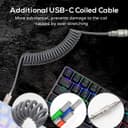
1xType-C cable

1xKeycap Puller

1xUser Manual

Product Description

Introduction:

This is a RGB backlight mechanical keyboard with 61 keys.It supports Wireless/Wired Dual Mode Connections to the device and Compatible with Windows/MacOS/Android.It has various application designs,such as All Keys Without Conflict,brilliant color Backlit and control of hardware Backlit


Specifications:

Size:11.4x3.9x1.7 inches

Layout:61 Keys

Backlight:RGB

Material:ABS

Switch:Blue or Brown or Red

Keyboard Colors:Black or White

Modes:Bluetooth 3.0 and Type-c USB

Voltage:5V

Systems Support:Windows XP/VISTA/7/8/10,IOS,Macos,Linux,Android


Method of Use

Combination Keys’ function

Press FN+Left Ctrl to switch to the second function of Combination Keys(except Arrow Keys).Press FN+Ctrl again,to restore the 9 keys main function Y/U/I/H/J/K/N/M/<,but the other Combination Keys still in the second function.Press FN+Ctrl third times,all the Combination Keys’ main function recovery.You can also lock/unlock Arrow Keys at any time by pressing FN+Enter

Use the Shortcut Keys

FN+A/S=Switch Win/Mac

FN+(F1-F12)=Achieve functions such as: Previous track,Mute and so on(Only for MacOs)

Adjust the Backlight

FN+(.>)=Adjust Backlight colors

FN+(\|)=Switch Backlight effects

FN+([{), (}]), (;:), ('”)=Adjust brightness and speed

Connect Bluetooth

1.Open the back switch of Keyboard to "on"

2.Select a group of BT modes to be connected through FN+Q/W/E

3.Press FN+Q for a long time.At this time,the Q key will flash,and the keyboard has entered the pairing mode

4.Open the computer/mobile BT,search and connect the device

5.Connect successfully,Q key stops flashing

Package Content:

1xRK61 Mechanical Keyboard

1xType-C cable

1xKeycap Puller

1xUser Manual