product-image
product-image
product-image
product-image
product-image
Product Image
    1
    2
    3
    4
    5
    6
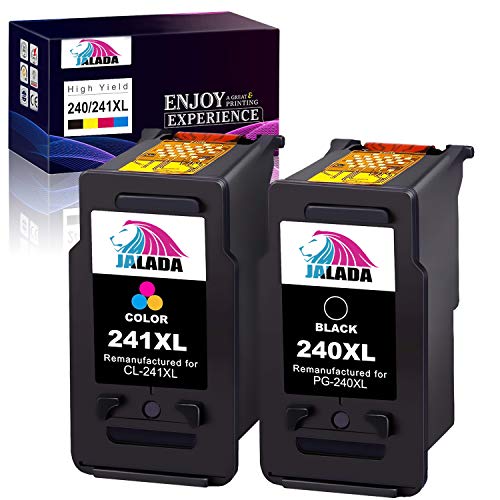
new | Jalada Remanufactured Ink Cartridge Replacement for Canon PG-240XL CL-241XL 240 XL 241 XL for Pixma MG3620 TS5120 MG2120 MG3520 MX452 MX512 MX532 MX472 High Capacity Ink (1 Black, 1 Color, 2 Pack)
Brand : Jalada
new | Jalada Remanufactured Ink Cartridge Replacement for Canon PG-240XL CL-241XL 240 XL 241 XL for Pixma MG3620 TS5120 MG2120 MG3520 MX452 MX512 MX532 MX472 High Capacity Ink (1 Black, 1 Color, 2 Pack)
Brand : Jalada
Availability : 
Out Of Stock
Click to connect with our customer support
Product Specifications
Conditionnew
AsinB08PY3S1VZ
CategoryOffice Products
SubcategoryInkjet Printer Ink
LeafcategoryCE
MPNPG-240/CL-241XL-2
OriginUSA
BrandnameJalada
Height1
Length1
Width1
Weight1
Product Details
Package Contents: 1 x Black 240XL 240 PG-240, 1 x Color 241XL 241 CL-241, total 2 cartridges
Page Yield: Black is 630 pages per cartridge, Color is 560 pages per cartridge (5% coverage)
Printer Compatibility: Canon PIXMA MG3620, MG3120, MG3122, MG3220, MG3222, MG3522, MG3520,MG2120, MG2220, MG4120, MG4220, MX372, MX392, MX432, MX439, MX452, MX459, MX470, MX472, MX479, TS5120, MX512, MX522, MX532 Printer
Intelligent IC Chip: Provide your printing with Vivid Color and sharp text
Well Packed:Every ink cartridge is very well protected with an air hole seal and a transparent film
Product Description
Jalada Ink, your printing supplies service specialist.Package including: 1 x PG-240XL Black Ink Cartridges 1 x CL-241XL Color Ink Cartridges (Total 2 combo packs)Printer compatibility:MG/TS Series: Pixma MG2120, Pixma MG2220, Pixma MG3120, Pixma MG3122 Pixma MG3220, Pixma MG3222, Pixma MG3520, Pixma MG3522 Pixma MG3620, Pixma MG4120, Pixma MG4220, Pixma TS5120MX Series: Pixma MX372, Pixma MX392, Pixma MX432, Pixma MX439 Pixma MX452, Pixma MX459, Pixma MX470, Pixma MX472 Pixma MX479, Pixma MX512, Pixma MX522, Pixma MX532PRODUCT FEATURES:Good tightness: The ink cartridge is ultrasonically welded to ensure that the cartridge casing is sealed and ink leakage and color mixing do not occur.Strong compatibility: 100% compatible with the original ink, ensuring that the ink dots are always smooth, even and clear.Naturally bright colors: High-quality ink, ink particles less than 20 nanometers, smooth printing, restore true color.High capacity: The ink is filled in a large amount, the utilization rate is high, the ink capacity is sufficient, and the ink is smooth.Tips: 1.Before placing an order, please be sure to confirm your printer model. 2.Please remove the transparent cover and pull off plastic tape before install these cartridges. (DONT TOUCH THE CHIP) 3.Printer screen pop up ?Non-Original Cartridge?? Please just click ?OK? and they will go ahead. 4.They occur an error message ?REPLACE CARTRIDGES? or LOW INK ? Please use a pencil eraser wipe copper contact (chip), or reinstall them several times.
Product Description
Jalada Ink, your printing supplies service specialist.Package including: 1 x PG-240XL Black Ink Cartridges 1 x CL-241XL Color Ink Cartridges (Total 2 combo packs)Printer compatibility:MG/TS Series: Pixma MG2120, Pixma MG2220, Pixma MG3120, Pixma MG3122 Pixma MG3220, Pixma MG3222, Pixma MG3520, Pixma MG3522 Pixma MG3620, Pixma MG4120, Pixma MG4220, Pixma TS5120MX Series: Pixma MX372, Pixma MX392, Pixma MX432, Pixma MX439 Pixma MX452, Pixma MX459, Pixma MX470, Pixma MX472 Pixma MX479, Pixma MX512, Pixma MX522, Pixma MX532PRODUCT FEATURES:Good tightness: The ink cartridge is ultrasonically welded to ensure that the cartridge casing is sealed and ink leakage and color mixing do not occur.Strong compatibility: 100% compatible with the original ink, ensuring that the ink dots are always smooth, even and clear.Naturally bright colors: High-quality ink, ink particles less than 20 nanometers, smooth printing, restore true color.High capacity: The ink is filled in a large amount, the utilization rate is high, the ink capacity is sufficient, and the ink is smooth.Tips: 1.Before placing an order, please be sure to confirm your printer model. 2.Please remove the transparent cover and pull off plastic tape before install these cartridges. (DONT TOUCH THE CHIP) 3.Printer screen pop up ?Non-Original Cartridge?? Please just click ?OK? and they will go ahead. 4.They occur an error message ?REPLACE CARTRIDGES? or LOW INK ? Please use a pencil eraser wipe copper contact (chip), or reinstall them several times.