doyoky leverless controller ps5 doyoky price online Price Online | Shop The World
From USA
NewDOYOKY
DOYOKY Leverless Controller for PS5
ℹ
Products from the USA may come with an input voltage of 110V–120V, requiring a step-down transformer. Check the device wattage to select the correct power converter.
•If your controller has been used with a PC or other device and you wish to reconnect it to your PS5, please follow the steps below. Step1: Hold the START button and connect the controller to a PC using a USB cable. Step2: Open any web browser and go to 192.168.7.1. Step3: Navigate to Settings → Input Mode Settings → Current Input Mode. Step4: Select "P5 General" from the list. Step5: Click Save, then click the Reboot button in the top‑right corner and select Controller. The controller will restart and should now be properly recognized by your PS5.
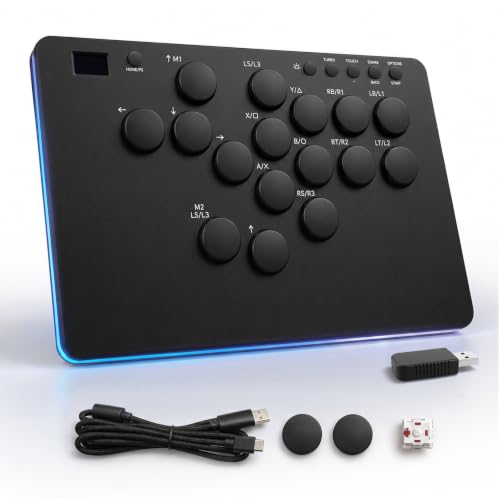
•【Compatible with PS5】This fight stick ships with an included Dongle and runs the dedicated firmware mode — plug in via USB-C and jump straight into games on your PS5 without workarounds.
•【HOT-SWAP EVERYTHING — MOD IT LIKE A MECHANICAL KEYBOARD】 All 16 mechanical switches (26mm arcade-style) and keycaps are fully hot-swappable. The box includes a keycap puller, 1 spare switch, 2 spare keycaps, and a 1.5m USB-C cable — so you can tune feel, color, and layout from day one without buying extras, just like a custom keyboard build.
•【BUILT FOR FIGHTING GAMES — REINFORCED USB-C, SOCD CLEANING, TURBO & M1/M2】 A reinforced USB-C port design addresses the durability complaint, while competitive-ready features cover all serious play: 3-mode SOCD cleaning (Neutral / Last Input / First Input), Turbo auto-fire, two customizable M1/M2 macro keys.
•【 WIRED ONLY, NOT FOR XBOX, DESIGNED FOR FIGHTING GAMES】 This is a wired leverless controller (1.5m USB-C cable included) — not wireless or Bluetooth. It is not compatible with Xbox Series X/S or Xbox One, and is designed for fighting games rather than dual-stick shooters. After switching to another platform, you can return to PS5 mode anytime via the web config page.
•【OLED SCREEN + WEB-BASED CONFIG — ZERO SOFTWARE INSTALL】 A built-in OLED display shows your current input mode, layout, and SOCD setting at a glance, while a browser-based config page (just visit 192.168.7.1) lets you remap keys.