product-image
product-image
product-image
product-image
product-image
Product Image
    1
    2
    3
    4
    5
    6
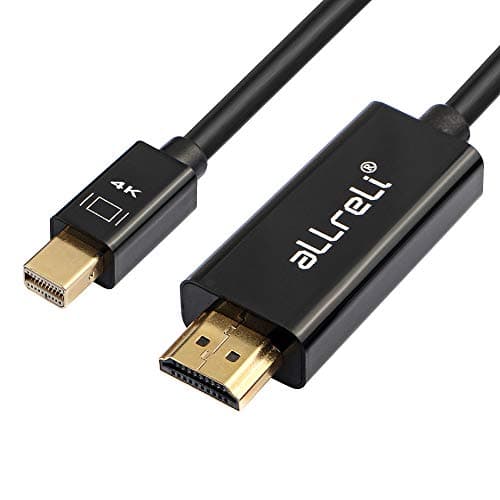
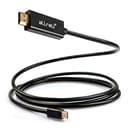
new | aLLreLi 6ft Mini DisplayPort to HDMI HDTV Cable, Full HD 1080p 4K Gold Plated HDMI Adapter Cable for iMac, MacBook Pro/Air and PC - Black
Brand : aLLreLi
new | aLLreLi 6ft Mini DisplayPort to HDMI HDTV Cable, Full HD 1080p 4K Gold Plated HDMI Adapter Cable for iMac, MacBook Pro/Air and PC - Black
Brand : aLLreLi
Availability : 
Out Of Stock
Click to connect with our customer support
Product Specifications
Condition
New
Asin
B07RPLBZ49
Category
Electronics
Subcategory
HDMI Cables
Leafcategory
BISS Basic
Color
Black
Connector Type
Mini HDMI
Origin
USA
Brandname
aLLreLi
Height
1
Length
1
Width
1
Weight
1
Product Details
?One-way Transmission?This cable connects a Mini DisplayPort with Thunderbolt TM port enabled computer to an HDTV, monitor, or projector with HDMI input for audio and video streaming. (Note: NOT bi-directional. Only converts signal from Mini DP to HDMI).
?Broad Application?The Mini DP to HDMI cable works for Apple MacBooks, MacBook Air, MacBook Pro, MacBook Mini and iMac made from 2010 onward that have Mini Display ports; Compatible with many PCs as well (Lenovo ThinkPad X230, L430/530, T430s/430/530 & W530, HP Envy 14/17, Dell XPS 14/15/17, Google Chromebook Pixel, Microsoft Surface for Windows 8 Pro, etc).
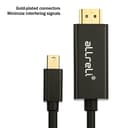
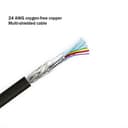
?Strong Signal?The cable builds in gold-plated conductors which can conductor resist corrosion and increase connectivity. The inner braided foil shielding reduces interference and improves signal quality. Support HDMI HD solution up to 1920*1080P.
?Long Lifetime?Low-profile connector does not block adjacent ports on your computer, has molded strain-relief for long life, and has ergonomically designed treads for easy plugging and unplugging.
?Attention?Mini DisplayPort is NOT compatible with Macs (before 2008) that have Mini-DVI. Please check your port before purchase!
Product Ranking
#6316 in HDMI Cables
#316096 in Electronics
Product Description
With the aLLreLi Mini DP to HDMI Cable, its possible to connect many laptops to LCD televisions, large monitors and projectors to check out the action in a whole new way!Key Features: *1080P Full HD * Premium chip * Gold-plated connectors * 24 AWG oxygen-free copper * Multi-shielded cable * ABS Shell Universally designed, the mini display port to HDMI cable will work with any computer that has a mini DP. With the Thunderbolt to HDMI Cable, youre ensured the best possible viewing experience. The mini DP to HDMI cable supports full 1920*1080P HD graphics and crystal clear audio. The cable features only the finest grade of 24AWG oxygen-free copper wire and has a multi-shielded housing, it greatly reduces signal loss and interference and is capable of standing the test of time.Instructions: Please drag the window on the desktop all the way over to the display edge and the window will be displayed on the HDTV. You may set HDTV to a mirror display. 1.With your TV connected to Mac, open System Preference 2.Select Display 3.Select Arrangement tag 4.Check Mirror Display Transmitting audio to TV 1.Open System Preference 2.Select Sound 3.Select Output tag 4.Choose external HDMI instead of built-in speaker
Product Description
With the aLLreLi Mini DP to HDMI Cable, its possible to connect many laptops to LCD televisions, large monitors and projectors to check out the action in a whole new way!Key Features: *1080P Full HD * Premium chip * Gold-plated connectors * 24 AWG oxygen-free copper * Multi-shielded cable * ABS Shell Universally designed, the mini display port to HDMI cable will work with any computer that has a mini DP. With the Thunderbolt to HDMI Cable, youre ensured the best possible viewing experience. The mini DP to HDMI cable supports full 1920*1080P HD graphics and crystal clear audio. The cable features only the finest grade of 24AWG oxygen-free copper wire and has a multi-shielded housing, it greatly reduces signal loss and interference and is capable of standing the test of time.Instructions: Please drag the window on the desktop all the way over to the display edge and the window will be displayed on the HDTV. You may set HDTV to a mirror display. 1.With your TV connected to Mac, open System Preference 2.Select Display 3.Select Arrangement tag 4.Check Mirror Display Transmitting audio to TV 1.Open System Preference 2.Select Sound 3.Select Output tag 4.Choose external HDMI instead of built-in speaker